
Card Verification Steps for No-Cost OnlyFans Signups
OnlyFans asks for a card number even when the page you want costs nothing, and the reason is simpler than it looks. A saved payment method works as an identity anchor, so a free subscription still starts with a $0.10 authorization hold. This guide covers every card verification step for no-cost signups, from the moment you type your details to the day the hold leaves your statement. BestOnlyFans tracks these mechanics across many free pages so you know what to expect before you begin.
The short version: the hold is real, it is small, and it returns. The rest is detail, but that detail is what stops people from panicking when a ten-cent entry appears at 2 a.m. BestOnlyFans refreshes its rankings every month.

Why OnlyFans Requires Payment Details for Free Pages
A free page carries a price of $0, but free does not mean anonymous. The platform uses the card on file as a lightweight gate that confirms the person behind the account is a real, billable adult. Paid subscriptions run from $4.99 to $49.99, and the same billing system powers the free side, so one pipeline serves both.
Four reasons show up most consistently in platform behavior and creator guidance.
- Age gate compliance: a verified payment method is a stronger age signal than a checked box.
- PPV purchase readiness: free pages earn through pay-per-view unlocks of up to $50, and the card must already be attached before purchase.
- Tip functionality activation: tips can reach $100, and tipping needs a live payment method on file.
- Fraud pattern detection: repeated card failures, mismatched billing data, or rapid account creation get flagged early.
None of this costs you a subscription price, because there is no subscription price. The card sits idle until you buy something, and the only immediate movement is the micro-hold discussed next.
The $0.10 Verification Hold Explained
When you save a card, the platform requests a temporary authorization of $0.10. This is an authorization, not a charge. The issuer reserves ten cents against your limit, the platform confirms the card is live, and the reservation is released. You never owe the money and you never pay it.
How it appears on your end varies by bank, and the table below breaks down the three dimensions subscribers ask about most.
| Aspect | Typical Behavior | Subscriber Action |
|---|---|---|
| Statement appearance | Shows as pending first, may post later or vanish | Check pending transactions, not the posted balance |
| Refund processing window | Same day to seven days depending on issuer | Wait one full billing cycle before contacting support |
| Communication method | Email alert from the bank, or a silent statement update | Enable transaction alerts so the entry is not mistaken for fraud |
Timing matters because a pending authorization can look like a real debit inside a mobile banking app. The distinction is simple: an authorization reduces available credit temporarily, while a charge reduces your actual balance.
Tip: screenshot the pending $0.10 entry the day it appears. If it has not cleared within ten days, that screenshot plus the date is the fastest thing your bank will ask for.
Step-by-Step Signup Security Protocol
The order of operations matters more than people expect. Doing security steps after you have saved a card leaves a short window where your details sit in a browser session you have not hardened.
- Verify the account email first and confirm the link before touching any payment field.
- Choose a username that does not repeat a handle you use on public social platforms.
- Enter the payment method on a private connection, never on shared or public Wi-Fi.
- Confirm the billing address matches what your issuer has on file, character for character.
- Authorize the $0.10 hold and wait for the confirmation screen rather than closing the tab.
- Monitor the temporary hold in your banking app over the next few days, not the next few minutes.
- Follow the free page and only then enable notifications, so purchase prompts do not arrive mid-setup.
Every step is reversible except the card entry, which is why it sits in the middle of the sequence rather than at the start.

Protecting Financial Data at Registration
The signup form is the highest-value target in the whole process, because that is where the card number exists in plain form. A few small habits remove most of the risk.
- HTTPS verification: confirm the padlock and the exact domain before typing anything.
- No public Wi-Fi without a VPN: unencrypted networks expose form traffic that HTTPS alone does not fully cover.
- Dedicated prepaid card: a separate card with a small balance keeps your primary account out of the chain.
- Autofill disabled: browsers that store card data can expose it to anyone with your unlocked device.
- Post-signup security review: turn on two-step authentication and check active sessions immediately after.
Two-step authentication is the single highest-return setting on the account, and it takes under a minute to enable.
Device hygiene counts too. A phone or browser profile you use for everything else carries cookies, extensions, and saved sessions with no connection to this signup. A clean browser profile is a reasonable precaution, not paranoia.
Card Holds Versus Actual Charges
Confusion here drives most support tickets. A hold reserves funds; a charge moves them. Both can appear on the same statement in the same week and look nearly identical at a glance.
| Characteristic | Verification Hold | Platform Charge |
|---|---|---|
| Amount | Fixed $0.10 | Variable, based on what you buy |
| Purpose | Confirms the card is valid | Pays for a subscription, PPV, or tip |
| Refundability | Released automatically | Governed by platform policy |
| Statement labeling | Pending authorization descriptor | Posted transaction descriptor |
| Dispute eligibility | Not applicable, nothing was charged | Eligible through your issuer |
| Issuer treatment | Reduces available credit briefly | Reduces actual balance |
Worth knowing: on paid pages the creator keeps 80% and the platform takes 20%, and promotional first months can dip to around $3. Base prices cannot go below $4.99. None of that applies to a $0 page, where the only transaction is the hold itself.
If a charge you did not authorize posts after a free signup, your first move is the issuer, not the platform. Card networks maintain established chargeback procedures built for exactly that situation.

What Happens When Verification Fails
Declines are common and rarely mean anything is wrong with your account. Address mismatches, expired cards, and issuer fraud rules cause most of them. Work through the stages in order.
- Read the decline notification carefully — it usually names the reason category.
- Try a different payment method rather than re-entering the same card immediately.
- Wait a full 24 hours before the next attempt; rapid retries look like card testing.
- Contact the issuer to confirm the card is not blocked for online or international use.
- Recognize the retry ceiling: repeated failures on one account trigger a temporary restriction.
- Repeated failures across new accounts can flag the account itself, so slow down.
One practical note for readers browsing directories: ranking sites exist because the platform has no built-in discovery feed, and a listing such as free onlyfans bermuda is a directory entry rather than a payment page. Card details never go to a directory.

Managing Multiple Free Account Verifications
Ten cents is trivial. Ten cents times a dozen signups in one afternoon is a pattern your issuer will notice, even though the total sits under two dollars. Banks score frequency, not just size.
- Cumulative authorizations: each hold reserves against your limit until it clears, so they stack briefly.
- Issuer perception: many small authorizations in a short window resemble card testing behavior.
- Statement clarity: a dozen identical ten-cent lines are difficult to reconcile later.
- Spacing between signups: spreading them across days keeps the pattern unremarkable.
If you are verifying several free pages, verify them over a week rather than an hour, and keep a simple note of which card went to which account.
Verification Refund Timing and Statement Appearance
The refund is automatic and invisible. Nothing is credited back because nothing was taken. What happens is simpler: the authorization expires and the reserved ten cents returns to your available credit. Same-day release is common with major issuers, and seven days is the realistic outer edge.
On your statement, look for a small pending line with a card-verification descriptor. Once it drops off, there is nothing left to reconcile. If it is still sitting there after a full cycle, call the issuer with the date and amount in hand.

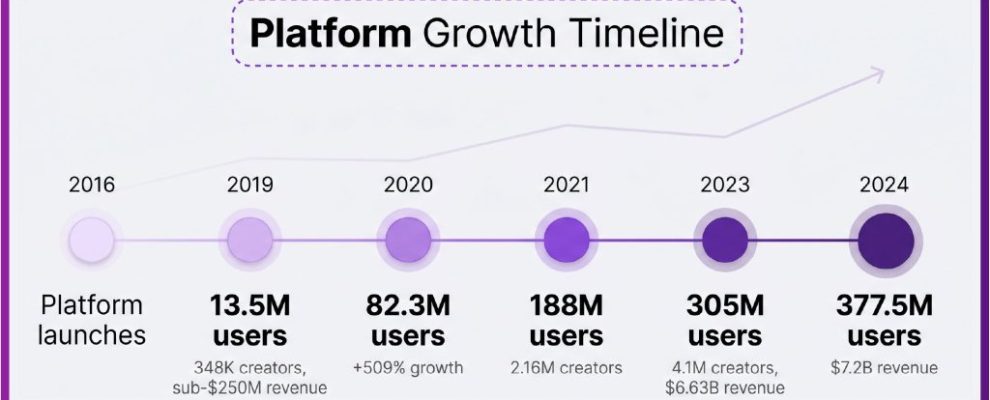
Context helps: the platform’s yearly user growth pushed millions of first-time card entries through the same pipeline, and the 2020 surge accounts for the largest single jump. That is why many issuers now recognize the descriptor on sight.
In our own review process, BestOnlyFans compares reported hold-release times against issuer documentation to confirm the windows described here still hold.

A final habit worth building: keep one card for subscriptions and nothing else. That makes every line on the statement legible at a glance, which is the whole point of separating holds from charges in the first place.
FAQ
Will the $0.10 verification hold affect my available credit?
Yes, briefly. The issuer reserves ten cents against your available limit while the authorization is live. The effect is negligible on any normal card and disappears once the hold is released.
How quickly does OnlyFans refund the verification hold?
Nothing is refunded because nothing is charged — the authorization simply expires. Same-day release is common, and up to seven days is normal depending on your issuer’s processing schedule.
Can I use the same card for multiple free OnlyFans page signups?
Yes, though spacing the signups across days is wiser than doing them in one sitting. Frequent small authorizations can look like card testing to an issuer’s fraud system even when the amounts are trivial.
Why does OnlyFans need my card if the page is free?
The card serves as an age gate, a fraud check, and a ready payment method for PPV unlocks and tips. A free page costs $0 to subscribe, but purchases on it still require an attached card.